
What Causes Step Errors on 5-Axis CNC Parts and How Can You Fix Them?
What Causes Step Errors on 5-Axis CNC Parts and How Can You Fix Them?

Have you ever pulled a complex part off your 5-axis CNC machine, only to find a frustrating step or misalignment between features? Despite investing in expensive equipment and spending hours perfecting your programs, these tiny but critical errors can destroy tight tolerances. Furthermore, these defects often appear inconsistently, making troubleshooting feel like chasing ghosts. The good news is that these problems have identifiable causes and proven solutions.
Quick Answer: What You Need to Know Right Now
Main Cause: Rotary axis centerline misalignment and thermal drift
Common Symptom: Visible steps between features machined at different angles
Solution: Kinematic calibration using systems like Heidenhain KinematicsOpt or Siemens calibration cycles
Frequency: Run at machine startup and after significant temperature changes
Typical Improvement: Reduces errors from ±0.05mm to ±0.01mm or better
Key Takeaway: Regular calibration transforms 5 axis cnc machine accuracy from a one-time specification into a maintained capability
Why Understanding Root Causes Matters
Before diving into solutions, it's important to understand what creates these accuracy problems in the first place. Consequently, you'll make better decisions about maintenance schedules and calibration strategies. Additionally, knowing the underlying mechanics helps you spot warning signs before they become expensive scrap parts. With this foundation, let's explore the technical reasons behind those frustrating step errors.
Table of Contents
- What Really Causes Those Visible Steps Between Machined Features?
- Why Does Accuracy Fade Throughout the Day?
- How Does Kinematic Calibration Actually Correct These Errors?
- When Should You Run Calibration to Maintain Accuracy?
- Conclusion
What Really Causes Those Visible Steps Between Machined Features?
You've programmed your part perfectly, verified your toolpaths, and double-checked your setup. Yet when you measure the finished workpiece, there's a noticeable step where features machined at different rotary positions meet. This issue frustrates machinists across industries, from automotive components to industrial machinery. So what's actually happening inside your machine?
The Hidden Culprit: Rotary Axis Centerline Error
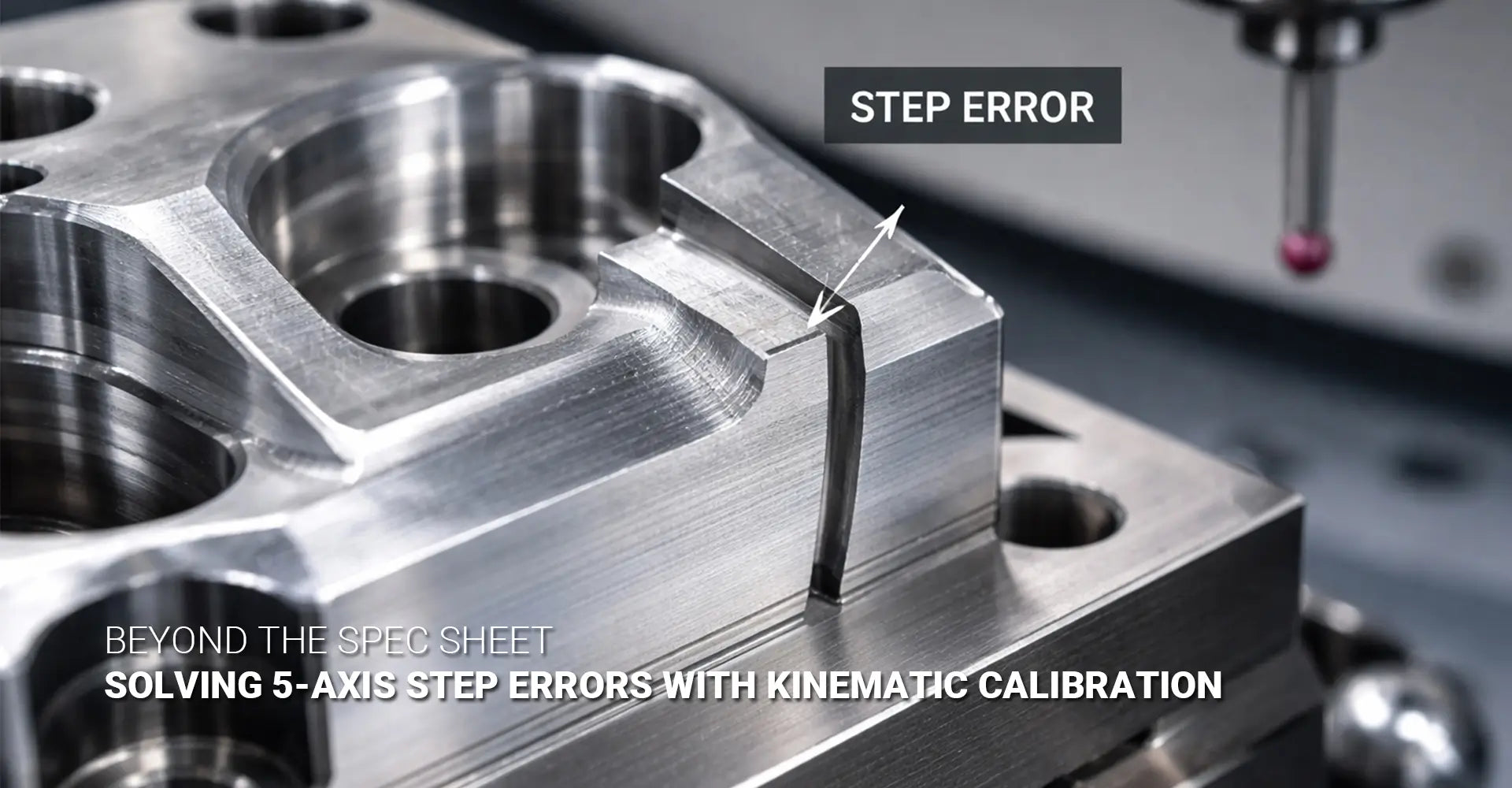
The primary cause of part misalignment 5-axis is rotary axis centerline error. In simple terms, this means the actual center of rotation doesn't match where your control system thinks it is. As a result, when your B-axis or C-axis rotates, the tool tip ends up in a slightly different position than programmed. This offset might only be 0.02mm to 0.05mm, but it shows up as a visible step error on part surfaces where features meet.
How Small Errors Create Big Problems
Here's where things get tricky. Even a tiny centerline error multiplies across your part geometry. For example, if your B-axis centerline is off by just 0.03mm, this error affects every point on your workpiece differently depending on its distance from the rotation center. Moreover, when both B-axis and C-axis errors exist simultaneously, they compound each other in unpredictable ways.
Think of it like this: imagine trying to draw a perfect circle with a compass, but the pivot point keeps shifting slightly. Similarly, your cutting tool follows a path that's slightly off from what the program intended. This explains why you might see perfect surface finish on individual features, yet poor alignment where they connect.
Additionally, thermal growth during the machine's warm-up cycle shifts these centerlines by 10 to 50 microns on typical machines. Therefore, a part machined first thing in the morning may differ from one made after lunch, even though nothing else changed. This thermal drift 5-axis effect is one reason why cold-state calibration alone cannot guarantee consistent accuracy throughout production runs.
On machines used for CNC turning and custom CNC milling services, maintaining these tight tolerances becomes even more critical as part complexity increases.
Why Does Accuracy Fade Throughout the Day?
Many shops notice an interesting pattern: parts machined early in the shift meet specifications perfectly, but by afternoon, the same program produces parts with slightly different dimensions. If you've experienced this frustrating phenomenon, you're not alone. The explanation lies in how your machine responds to temperature changes over time.
Temperature: The Silent Accuracy Killer
Your 5-axis machine is essentially a large assembly of steel and cast iron components. Like all materials, these expand and contract with temperature changes. While this sounds simple, the effects on accuracy are surprisingly complex. As the machine warms up from overnight cooldown, different components heat at different rates, causing dimensional changes throughout the structure.
How Thermal Growth Disrupts Geometry
The bearings supporting your rotary axes generate heat through friction during operation. Subsequently, the bearing housings expand, which shifts the actual centerline position of the B-axis or C-axis. Furthermore, the machine bed, columns, and spindle housing all experience different thermal expansion rates based on their mass, material, and exposure to heat sources.
Research shows that typical production machines experience thermal drift ranging from 0.015mm to 0.040mm as they transition from cold startup to full operating temperature. This shift happens gradually over 1 to 3 hours, which is why your first few parts might be perfect while later ones drift out of tolerance.
Here's the critical point: bearing preload also changes with temperature. As bearings warm up, clearances tighten or loosen depending on the preload design. Consequently, the rotational stiffness and centerline stability of your rotary axes vary throughout the day. This explains why cold-state 5 axis machine calibration performed overnight cannot account for these dynamic conditions during production.
For shops working with temperature-sensitive metals and plastics, understanding these thermal effects becomes absolutely essential for maintaining consistent quality.
How Does Kinematic Calibration Actually Correct These Errors?
Now that we understand the problem, let's explore the solution. Kinematic calibration represents a systematic, measurable approach to correcting the rotary axis position errors we've discussed. Instead of chasing symptoms, this method addresses the root cause directly by updating your machine's understanding of its own geometry.
What Kinematic Calibration Really Does
At its core, kinematic calibration uses precision probing to measure the actual geometry of your machine's rotary axes. Then it compares these measurements to the theoretical geometry stored in your control system. The differences between actual and theoretical positions become compensation values that the control applies automatically during machining operations. This process is called improving 5-axis accuracy through mathematical correction rather than physical adjustment.
Think of it like calibrating a scale. You don't physically bend the scale to make it accurate; instead, you program it to know "when I read 100g, the actual weight is 101g." Similarly, your CNC control learns "when I command B-axis to 45°, the actual centerline is 0.027mm offset from where I think it is."
![calibration sphere/artifact being probed on 5-axis machine]](https://cdn.shopify.com/s/files/1/0915/0434/5380/files/calibration_sphere_being_probed_on_5-axis_machine.webp?v=1768792800)
The Step-by-Step Calibration Process
The calibration workflow follows a logical sequence that takes 15 to 45 minutes depending on your machine configuration:
Step 1: Mount the Calibrated Artifact
First, you secure a precision calibration sphere, cube, or specialized artifact to your machine table. These artifacts have known, certified dimensions traceable to national standards. Their geometry serves as the reference against which your machine measures itself.
Step 2: Run Automated Probe Cycles
Next, your machine executes a series of probing moves at different rotary axis positions. The control might probe the artifact at B0°/C0°, then B45°/C90°, then B-30°/C180°, and so on through a predetermined pattern. Each probe touch records the actual position of the artifact surface.
Step 3: Calculate Centerline Offsets and Angular Errors
The control's calibration software analyzes all these probe points mathematically. It calculates where the B-axis and C-axis centerlines actually are in space, compared to where the kinematic model says they should be. Additionally, it identifies any angular misalignment (tilt) between axes.
Step 4: Apply Compensation Values
Finally, the system updates the machine's kinematic model with volumetric accuracy compensation values. From this point forward, every toolpath calculation includes these corrections automatically. You don't change your part programs at all; the control handles the compensation transparently.
Heidenhain KinematicsOpt vs. Siemens Approach
Both leading control manufacturers offer automated calibration systems that follow this same basic principle, though with different interfaces. Heidenhain KinematicsOpt provides a guided workflow through the iTNC control's calibration menu. You select your calibration artifact type, and the system walks you through each probing sequence. The entire process runs semi-automatically, with prompts for operator confirmation at key steps.
Siemens takes a similar approach with their kinematic compensation cycles, though the menu navigation differs. The Siemens dynamic accuracy calibration also allows for more advanced compensation strategies on certain control models. However, both systems achieve essentially identical results: they measure actual geometry and update the kinematic model to match reality.
The key advantage of these automated systems over manual methods is consistency and speed. Where manual calibration might take hours and require specialized metrology skills, automated cycles complete the job in under an hour with minimal training. Moreover, the mathematical algorithms handle complex calculations that would be impractical to do manually.
When Should You Run Calibration to Maintain Accuracy?
Understanding calibration is valuable, but knowing when to perform it separates good shops from great ones. Rather than waiting for problems to appear, successful precision manufacturers build calibration into their regular workflow. This proactive approach prevents scrap instead of reacting to it.
Daily Calibration for High-Precision Work
For shops holding tolerances tighter than ±0.02mm, running kinematic calibration at machine startup makes sense as standard practice. This daily routine captures the thermal state of the machine right when production begins. Since the calibration takes only 20 to 30 minutes, it's a small investment compared to the cost of scrapping even one complex part.
Many shops run calibration during the machine warm-up period while operators prepare tooling and load programs. By the time setup is complete, the machine is both thermally stable and kinematically calibrated. This workflow integrates seamlessly into existing processes without adding significant cycle time.
Critical Triggers That Demand Immediate Calibration
Certain events should trigger immediate recalibration, regardless of your regular schedule:
After Crashes or Collisions
Any impact that involves the rotary axes potentially shifts bearing preload or damages precision surfaces. Even minor crashes that leave no visible damage can affect centerline accuracy. Therefore, always recalibrate before returning the machine to production after any collision.
When Tolerances Suddenly Tighten
If a new job requires ±0.01mm tolerances but your current work only needs ±0.05mm, recalibrate before starting. The machine's existing compensation values might be adequate for looser work but insufficient for precision requirements.
Temperature Changes Exceeding 3°C
Significant shop temperature swings, such as opening bay doors in winter or HVAC failures, warrant recalibration. The thermal growth we discussed earlier accelerates when ambient temperature changes rapidly.
Quarterly Baseline Maintenance
Even if you calibrate frequently, quarterly baseline calibrations serve an important diagnostic purpose. By tracking how compensation values change over time, you can predict mechanical wear before it causes failures. For instance, if your B-axis centerline offset gradually increases from 0.015mm to 0.035mm over six months, this trend indicates bearing wear that needs attention.
This predictive approach prevents catastrophic failures that shut down production. Rather than waiting for a bearing to seize, you schedule maintenance during planned downtime based on calibration data trends. Additionally, documenting these values provides quality records that customers increasingly demand, especially in regulated industries.
After bearing service or major mechanical work on rotary components, always perform calibration before releasing the machine to production. The installation process inevitably introduces small variations in centerline position, even with identical replacement parts.
Conclusion
Step errors and part misalignment on 5-axis machines stem from measurable, correctable causes rather than mysterious gremlins. Specifically, rotary axis centerline error combined with thermal drift creates the position offsets that show up as visible defects where machined features meet. These errors are not equipment failures but rather natural consequences of precision mechanical systems operating in real-world thermal environments.
The solution lies in kinematic calibration, which transforms accuracy from a static specification into a maintained capability. By regularly measuring your machine's actual geometry and updating its kinematic model, you compensate for the thermal growth and mechanical variations that inevitably occur during production. This proactive approach pays for itself through reduced scrap, eliminated rework, and the confidence to hold ±0.01mm tolerances consistently.
Whether you use Heidenhain or Siemens controls, the principle remains the same: measure, calculate, and compensate. Modern automated calibration cycles make this process fast and accessible, removing the barriers that once made kinematic calibration a specialist activity. For shops serious about precision, integrating calibration into daily startup routines represents best practice rather than optional maintenance.
The key takeaway is simple: your 5-axis machine's accuracy is not fixed at installation but rather maintained through regular calibration. Just as you wouldn't expect cutting tools to stay sharp forever, you cannot expect kinematic accuracy to remain constant without attention. By understanding the causes of accuracy loss and implementing systematic calibration workflows, you transform unpredictable accuracy problems into predictable, controllable processes.
Recommended Resources
[5 axis cnc machine accuracy][^1]
[rotary axis centerline error][^2]
[kinematic calibration][^3]
[Heidenhain KinematicsOpt][^4]
[part misalignment 5-axis][^5]
[Siemens dynamic accuracy][^6]
---
[^1]: Understanding these factors can help improve precision in machining processes.
[^2]: Exploring solutions can enhance the performance and reliability of CNC machines.
[^3]: Understanding kinematic calibration is crucial for precision in engineering applications, making this resource invaluable.
[^4]: Exploring Heidenhain KinematicsOpt can enhance your knowledge of advanced machine calibration techniques, boosting operational efficiency.
[^5]: Understanding part misalignment can help improve machining accuracy and efficiency in 5-axis operations.
[^6]: Exploring Siemens dynamic accuracy can provide insights into optimizing precision and performance in manufacturing.


Hello !
Hi. A 49 fantastic website 1 that I found on the Internet.
Check out this site. There’s a great article there. https://nextleveltricks.net/reaction-to-abramovich-selling-chelsea/|
There is sure to be a lot of useful and interesting information for you here.
You’ll find everything you need and more. Feel free to follow the link below.
Hello friends!
I came across a 169 interesting page that I think you should check out.
This tool is packed with a lot of useful information that you might find insightful.
It has everything you could possibly need, so be sure to give it a visit!
https://wavetechglobal.com/learn-about-iphone-14-series-newest-editions/
And remember not to neglect, everyone, which a person at all times may in this particular article find answers to address the most most tangled inquiries. Our team attempted to present the complete information in an extremely accessible way.
Hello .!
I came across a 160 very cool tool that I think you should take a look at.
This resource is packed with a lot of useful information that you might find insightful.
It has everything you could possibly need, so be sure to give it a visit!
https://baronmag.ca/2024/11/the-ansoff-matrix-and-how-it-helps-your-business-grow/
Furthermore do not neglect, everyone, that you always may within this publication locate solutions to the the absolute complicated queries. We tried to lay out the complete information in the most most accessible manner.